
Two of the most useful AI tools my team has added to our daily stack in the last six months are Chinese: Kimi by Moonshot AI and Minimax. Both are genuinely incredible, both run circles around several US tools at the specific things they do well, and both are now load-bearing parts of how Seahawk Media ships client work in 2026. If you have not tried either, you are missing real production-grade capability.
Key takeaway: Prompt with Claude or GPT, then execute with Kimi for deep research and Minimax for full-app mockups, collapsing days of agency work into minutes.
I am writing this from the operator side, not the model-benchmark side. We use Claude and GPT every day too, and we are not switching off them. The argument here is simpler: the right way to use Kimi and Minimax in 2026 is alongside Claude or GPT, not in place of them, and once you have the workflow tuned the output quality on both deep research and design mockups is at a level US tools have not reached yet on the same single-prompt experience.
What are Kimi and Minimax?
Kimi is the consumer chat product from Moonshot AI, a Beijing-based lab that became famous in 2024 for launching the first widely-used model with a 2 million token context window. The Kimi K2 release in late 2025 added strong agentic and code capabilities, and the Kimi Researcher product is the deep-research agent that gets the most use on my team. Kimi is free for general use and the international web version works without a Chinese phone number, which was the friction point that kept most non-Chinese teams away in 2024.
Minimax is the Shanghai-based lab behind Hailuo (the video generation product everyone passes around on Twitter), the MiniMax M1 reasoning model, and the MiniMax Agent product that generates fully working web app demos and high-fidelity UI mockups from a single prompt. Like Kimi, Minimax is free at the consumer tier and offers paid API access for integration work.
Both companies open-source significant pieces of their stack. Kimi K2 weights are public on Hugging Face. MiniMax-Text-01 and MiniMax M1 are open-weight too. That is not a small detail when you are deciding which tools to build a workflow around: it means the underlying capability is auditable, runnable on your own infrastructure if regulation demands it, and unlikely to disappear behind a corporate paywall change overnight.
How my team uses Kimi for deep research
Kimi Researcher is the deep-research mode my team reaches for first when we need a structured research output rather than a chat answer. The flow is: you describe the question, Kimi plans a multi-step research path, executes web searches, reads the source documents end-to-end (the long context is genuinely the differentiator), and returns a structured report with citations. A research run that would take a human analyst three to four hours produces a comparable output in roughly twelve to fifteen minutes.
The specific use cases we run every week: competitive analysis briefs for client proposals, market sizing memos for early-stage startup work, technical landscape reviews for new domains we are about to ship pages on, and editorial briefs for the long-form content we publish on HostList.io. The output quality is high enough that the analyst who used to do this work spends their time validating and reframing rather than gathering. That is a real productivity shift.
Where Kimi falls short: tone calibration. The default voice of Kimi output reads slightly translated, slightly formal, slightly committee-written. We always run the output through Claude for tone and structure rewriting before it lands in any client deliverable. Kimi gathers and synthesises; Claude polishes and humanises. That two-step pass is the workflow.
How my team uses Minimax for design mockups
Minimax Agent is the tool that surprised me the most in the last six months. You describe an interface in plain English, give it a brand reference if you have one, and roughly thirty to ninety seconds later you get a fully working HTML and Tailwind prototype that you can click through. Not a screenshot. Not a wireframe. A real running app with state, navigation, and reasonable component design. The quality is at the level that I have shipped Minimax-generated mockups directly into client pitch decks without further design work.
Below is the kind of UI density and polish Minimax can produce from a single prompt today. This took roughly forty seconds, no manual styling, no Figma, no design system handoff:
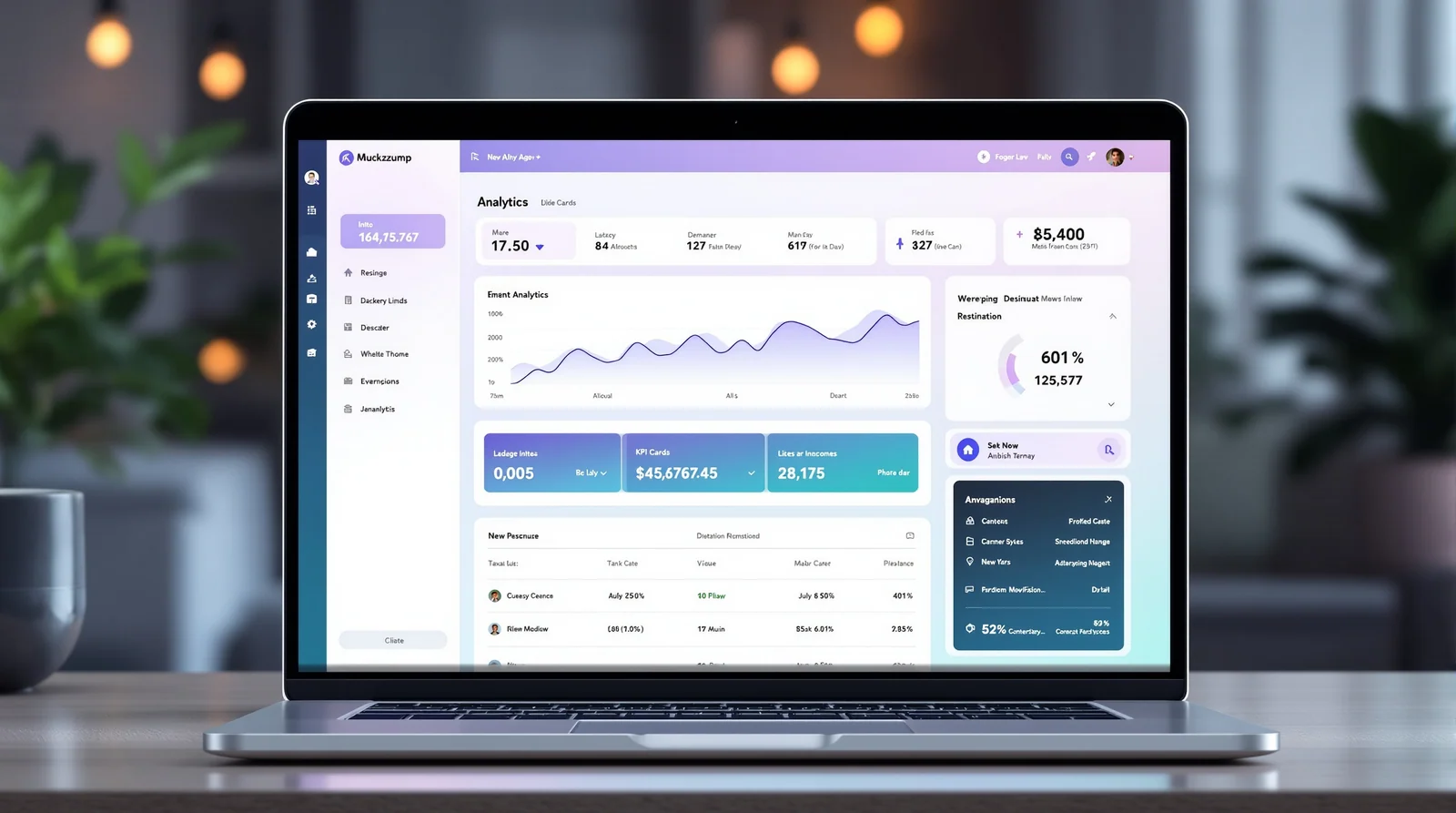
Compare that to the equivalent workflow eighteen months ago: a designer spent two days in Figma producing a static mockup, the developer rebuilt it in code, and the prototype was clickable on day five. Today, the agency that wins is the agency that can put a working prototype in front of a client at the end of the discovery call.
Where Minimax falls short: brand precision. Out of the box, the design language is generic-modern. If your client has a strong existing visual identity, you have to spend prompt time describing typography, colour, spacing, and component conventions, and even then the output reads as the model's interpretation rather than the brand itself. For early-stage clients without strong identity yet, this is a feature, not a bug. For mature brands, you are using Minimax as a starting point and finishing in Figma.
The workflow: prompt with Claude or GPT, build with Kimi or Minimax
The single biggest unlock I have had with these tools came from realising that the best prompts for Kimi and Minimax are not written by hand. They are written by Claude or GPT. Sounds obvious in retrospect; it took me a month to actually do it.
The flow looks like this. I describe the goal to Claude in three or four sentences. I ask Claude to write an optimal prompt for Kimi Researcher (or Minimax Agent) given that goal, including the structure I want in the output, the constraints, the tone, and any specific sources or component patterns to anchor on. Claude writes a four-hundred-word prompt that is more precise than anything I would write myself in five minutes. I paste that into Kimi or Minimax, and the output quality is materially better than if I had prompted directly.
This pattern, prompt-engineer with one model, execute with another, is the highest-use workflow my team has adopted in the last twelve months. It works because Claude and GPT are very good at meta-tasks (planning, structuring, writing instructions for other systems) while Kimi and Minimax are very good at execution-shape tasks (running a research path, generating a working interface). Use each tool for the thing it is best at.
Specific use cases we run every week
Five concrete examples from the last fortnight at Seahawk Media:
Competitive landscape brief for a B2B SaaS pitch, Claude-prompted, Kimi-executed, Claude-rewritten. Two hours total instead of the two days the same brief used to take. The client called it the best competitive memo they had seen from any agency.
Clickable demo for a directory-website proposal, built with Minimax Agent from a six-line description. Forty seconds to first prototype, twenty minutes of iteration, a working demo with three screens shipped to the client. The client signed before the calendar week ended.
Internal admin dashboard for our editorial calendar, built with Minimax Agent from a description of the data model. The output was good enough to ship to the team after about an hour of polishing. Total elapsed time from idea to working internal tool: under ninety minutes.
Translation quality review for a programmatic SEO project, where Kimi handled the long-context cross-checking across thousands of translated strings. The cost of catching subtle mistranslations dropped to roughly the cost of a Kimi run.
Technical landscape review of headless CMS pricing models. Kimi Researcher in twelve minutes, Claude rewrote the output, the brief turned into the foundation of a public-facing post the next day.
Why these Chinese AI tools are ahead on full-app generation specifically
I do not have privileged insight into the model architectures, but the pattern across the products is consistent. The Chinese consumer AI products optimise harder for one-shot completion of complex multi-modal tasks than the US equivalents do. Claude Artifacts is excellent for iterative coding inside a chat. ChatGPT canvas is excellent for collaborative document work. Neither is designed around the idea that a single prompt should produce a fully running prototype that you click through.
Minimax is. The product surface, the model behaviour, the output format, all of it is built for full-app generation as the primary workflow rather than as one feature among many. The same is true of Kimi Researcher: it is purpose-built for end-to-end research runs rather than for a chat turn that happens to do research. When a tool is designed around a specific capability rather than offering it as an option, the quality on that specific capability tends to be ahead.
The geopolitics are real and worth naming honestly. There are reasonable conversations to have about data residency, about US export controls, about what running client work through Chinese infrastructure means for sensitive engagements. We do not put confidential client data through either tool. Public market research, brand-anonymous design briefs, and internal tooling are all fair game. That mental model has not slowed us down meaningfully.
What this means for agency work in 2026
The two-day mockup is gone. The four-hour competitive memo is gone. The week-long technical landscape review is gone. Any agency that still bills those workflows at the old rates and timelines is competing with agencies that have already collapsed the cost structure by an order of magnitude. The work has not disappeared; the use has shifted to the operators who know which tool to point at which problem.
My read for the next twelve months: the agencies that win will be the ones with explicit AI workflows documented and rehearsed across the team, not the ones with the best individual operators using AI ad hoc. Workflow use compounds. Individual productivity gains do not.
Bottom line
Kimi and Minimax are real production-grade tools, both free to start, both worth adding to your stack this week. Use Claude or GPT to prompt-engineer them. Run Kimi for deep research. Run Minimax for design mockups and full-app generation. The combination is the most useful AI workflow I have added since Claude itself shipped Sonnet 3.5.
Two more honest notes. First, the products are evolving fast and the specific feature surface I am describing here will be different in three months. The workflow shape will not. Second, I have no commercial relationship with either company; this is the working stack of a London-based agency owner who tries everything and keeps what survives the morning after.
Try both. Compare to Claude and GPT honestly on your own tasks. Keep what wins. That is the only durable framework for choosing AI tools in a year where the leaderboard turns over every six weeks.
Related reading
Prompt engineering in 2026: what it is, what it pays, and where it is going
Designing software with Claude: my brainstorm-to-spec workflow
AEO and GEO in 2026: a practical playbook
Frequently asked questions
What are Kimi and Minimax?
Kimi (by Moonshot AI) and Minimax are two Chinese AI tools. Kimi is used here for deep research and Minimax for full-app design mockups. Both perform at a level that, for those specific tasks, rivals or beats several US tools in daily agency use.
Is Kimi good for deep research?
In this workflow, yes. Kimi handles long-context, multi-source research well and is used daily for exactly that. The approach is to prompt and plan with Claude or GPT, then run the heavy research pass through Kimi, combining each tool's strength rather than relying on one.
What is Minimax used for?
Minimax is used for design mockups, specifically full-app generation, where it is ahead of several US tools. The pattern is to shape the brief with Claude or GPT and then build the visual mockup in Minimax, getting further faster than general-purpose tools manage on full-app design.
Should agencies use Chinese AI tools like Kimi and Minimax?
For specific tasks they are worth testing, because they lead on deep research and full-app mockups respectively. Weigh data and privacy considerations for client work as you would any third-party tool, and use them where they genuinely outperform rather than by default.