Dental website design that fills the new-patient diary, not the awards shelf
Dental practice marketing is mostly Google. Local pack ranking, before-and-after galleries that load in under 2 seconds, online booking that does not break, and content the patient actually reads.
BOOK YOUR 30-MIN CALL Discuss your website
Who I build for
Dental practices have a clear marketing equation: Google Business Profile + local SEO + online booking that works = new-patient phone calls. The web designers who deliver that win the brief. The ones who deliver award-show portfolios usually do not.
The dental clients I take on tend to fit one of these three shapes:
- Single-location dental practices in the UK or US needing local-pack rankings
- Multi-location practice groups needing consistent branding across sites with local SEO per location
- Specialist practices (orthodontics, cosmetic dentistry, implants) needing service-specific landing pages
What dental businesses get wrong about their websites
The local pack is the entire game
Most dental searches happen on mobile, with location intent, and click into the local pack rather than the organic results. Optimisation priority: Google Business Profile completeness, real review velocity, NAP consistency across citations, LocalBusiness schema with practice-specific service offerings.
Before-and-after galleries kill page speed
The standard dental site mistake is uploading 50 before-and-after images at 4MB each. Lighthouse mobile tanks to 30. The fix is image optimisation pipeline (WebP, lazy load, proper sizing) baked into the build, not a plugin you remember to enable.
Online booking integration matters
Dentists who integrate online booking (Dentally, Software of Excellence, NexHealth, or similar) capture significantly more new patients. The booking widget needs to load fast, work on mobile, and not break the rest of the page. This is a real engineering decision, not just a copy-paste embed.
What a dental website has to include
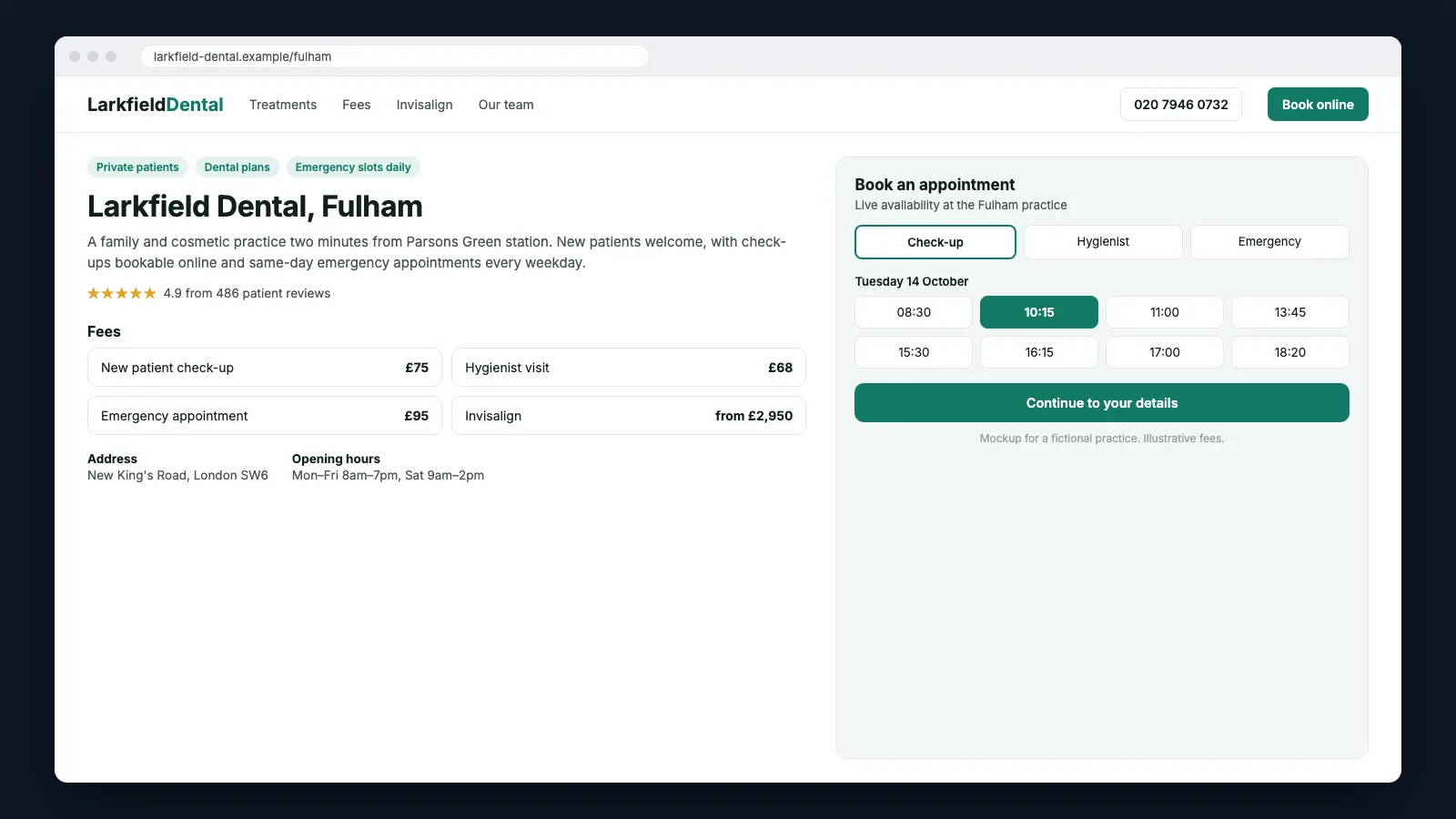
- A page for every practice Address, opening hours, click-to-call, directions, the team, reviews and a booking button, with Dentist schema to match. Bupa, Aspen, Tend and Western Dental all build this. It is the page that ranks for 'dentist near me' and '[area] dentist'.
- Say who you are taking on Whether the practice is accepting new NHS or private patients, or has appointments today, should be visible before anyone books. Bupa, mydentist and Tend all put it on the page. It saves a wasted phone call on both sides.
- Prices with a monthly figure Offer a fee list for routine care and a cost page for each major treatment (implants, Invisalign, veneers). Show the price beside the monthly finance figure, as Harley Street Dental Studio and Aspen do.
- Booking that starts on the page Put a book button on every practice and treatment page. It should open your booking system with the practice and visit reason already set, not a generic contact form.
- Treatment pages that answer the questions Cover what happens, how long it takes, what it costs and who does it. Add before-and-after cases that load quickly, and a date showing when the page was last reviewed.
- Galleries that do not slow the page Resize before-and-after images and serve them as WebP, lazy-loaded below the fold. A gallery of fifty cases then still loads quickly on a phone.
Dental websites worth studying
No affiliation with any of these businesses. They are here because each one gets a specific part of the job right, and that part is worth copying.
- Bupa Dental Care UK
Each practice page says plainly which NHS and private patients it is accepting. It then links to that practice's own price list and before-and-after gallery. Treatment pages pair a step-by-step guide with a finance calculator and a visible review date.
- mydentist UK
NHS, mid-price and premium private care appear as three named tiers, so patients can compare what each includes before they call. Treatment pages carry a practice finder, and it can be filtered to practices taking new patients.
- Harley Street Dental Studio UK
The practice publishes a separate cost page for each major treatment, with every price shown next to its monthly finance figure. And a full fee list of close to a hundred items backs those pages up.
- Aspen Dental US
The homepage opens on the visitor's nearest offices. Each shows its rating, review count and next opening time, with call and schedule buttons. Treatment cost pages give an average price and a monthly figure, and the full range sits in the small print.
- Tend US
City pages filter studios by who is open now and who has appointments today. Each Book Now link opens the booking flow with that studio already chosen. And pages for every city and service pair, and every city and insurer pair, pick up local searches.
- Western Dental US
A full Spanish version runs down to each office page, with matching hreflang tags. Medi-Cal and Medicaid patients get their own pages in the main menu. So public cover is as easy to find as private finance.
How I work
I am the senior on every engagement, with twelve years and more than five thousand sites of practice behind the process. The build runs on Next.js, Astro or headless WordPress depending on who edits the site, and if you are replacing an existing site, the redirects, metadata and schema move across with it so the rankings do too.
Dental website design FAQs
Should a dental website show prices?
Yes. Publish a fee list for routine care and a cost page for each major treatment, ideally with the monthly finance figure next to the price. Patients compare practices on cost. A practice that hides it loses the comparison.
Can patients book online directly from the website?
Yes, if your practice management or booking system offers online booking or an embeddable widget. The website's job is to put that booking on every relevant page, with the right practice and visit type already selected.
Do we need a page for each practice?
If you have more than one site, yes. Each practice page needs its own address, hours, team, reviews and booking link, plus Dentist schema and a matching Google Business Profile. One shared page cannot rank in several areas.
How should we handle NHS and private patients on the site?
Say clearly on each practice page which patients you are accepting and what each option includes. mydentist's three named tiers are a good model: NHS, mid-price and private care laid out side by side.
What schema does a dental website need?
Dentist markup with address, geo coordinates and opening hours on each practice page. Add FAQ markup where you answer questions, and breadcrumbs across the site. Keep it identical to what the page shows.
Related services and industries
When you're ready
Book a 30-minute call. No slide deck, no qualification screen. You describe the dental business, the brief, the timeline. I tell you whether I am the right person, and by the end of the call you have a stack pick, a price range, and a realistic delivery window.