

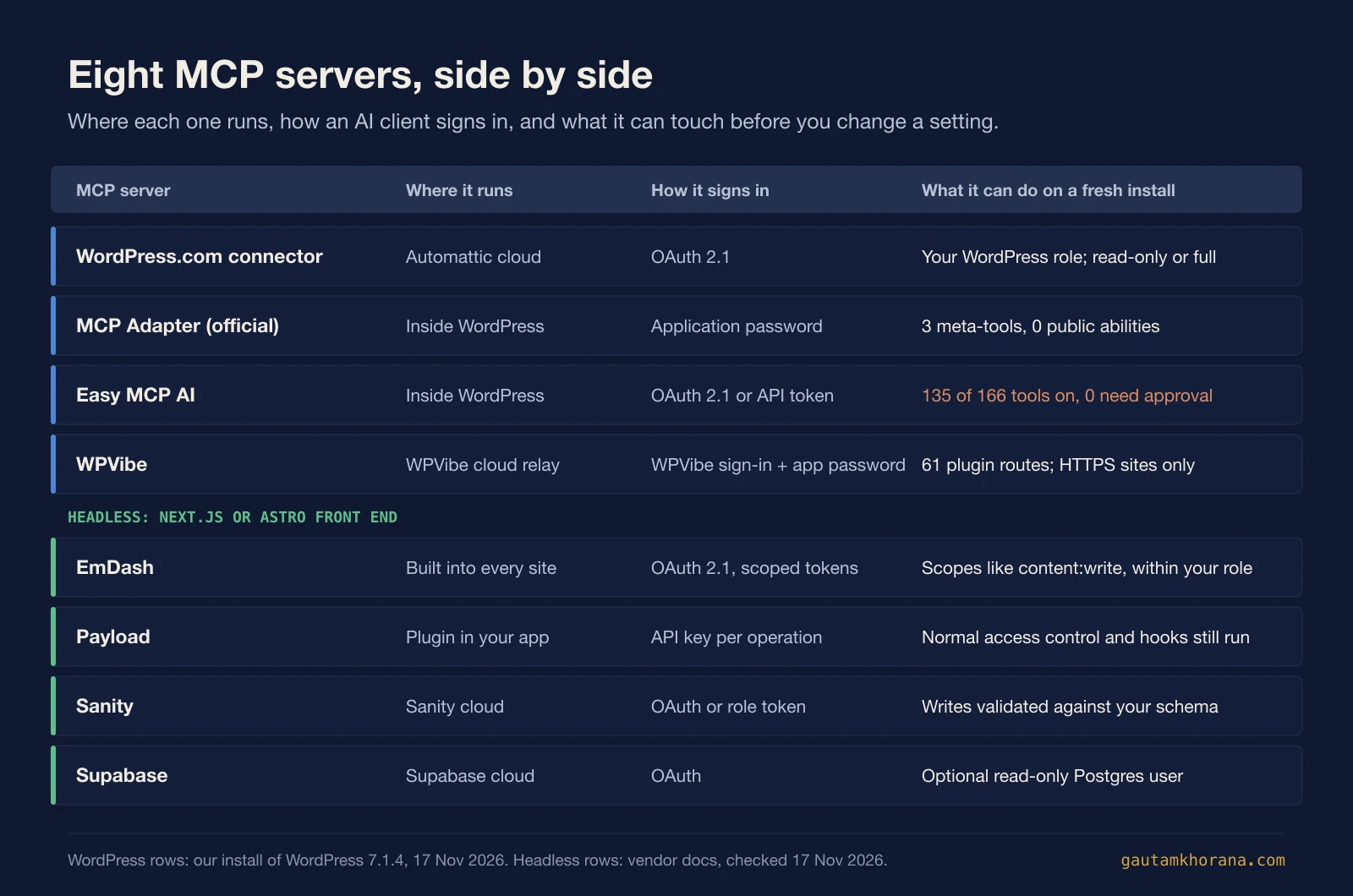
There are three WordPress MCP server routes worth weighing in November 2026, and the decisive difference is where the server runs and what it enables by default. Easy MCP AI runs inside your site. WPVibe relays through a hosted server. The official MCP Adapter exposes only what a site chooses to publish. On a fresh install I ran, the adapter listed 3 tools while Easy MCP AI had 135 enabled. Below: what each route does, a side-by-side table, a pre-connection checklist, and the case for a typed headless stack when agents do most of the editing.
The short answer
If you want Claude or ChatGPT to edit a self-hosted WordPress site today, there are three realistic routes, plus a fourth if you're on WordPress.com.
- Easy MCP AI is a free PHP plugin that turns your site into the MCP server. Broad, fast to start, and everything stays between your AI client and your site.
- WPVibe is a free plugin plus a hosted server. Setup is the friendliest of the three, reach is the widest, and a metered allowance of tool calls pays for it.
- The official MCP Adapter with the Abilities API is the narrowest. It exposes only abilities a site has made public, and it is private by default.
- The WordPress.com connector covers sites on a WordPress.com account, with access following the user's role.
That's the WordPress side. The other half of the answer is that, if agents will do real, repeated editing work, a headless stack (Next.js or Astro with Payload, Sanity, EmDash or Supabase) gives the agent a typed contract instead of a pile of plugin-specific tools. I'll make that case in section nine, fairly, because WordPress still wins on several things.
For the full scorecard of WordPress against headless MCP, see WordPress MCP vs headless CMS MCP. This post is the hands-on companion to that comparison.
What the Repository essay gets right, and what it skips
The starting point for this piece is What page builders taught me about MCP, an essay urging plugin and theme authors to embrace MCP. It should be stated plainly: it is sponsored, and its author, Ionut Neagu of Vertigo Studio and Themeisle, owns Easy MCP AI. That doesn't make it wrong. It does mean you should read it as a founder with a product in the race.
He's right on several counts. The business shift is real: when an agent sits between the customer and your interface, the old assumption that you control the experience stops holding. His line is sharper than mine: "When you no longer own the application layer and control the experience, you are at risk." Plugin authors who ignore that are betting against where the traffic is going.
He's also right that agents ignore upsells. A tool description that nudges toward a Pro tier is wasted tokens, because the model reads it as noise and moves on. And the push for token-efficient tool design is sound. Every tool you list costs context before the agent does anything useful.
Here's what the essay leaves out.
- Security. Handing an agent write access to a CMS is a privilege question first and a growth question second. Nothing about scoping, approvals or credentials.
- Hosted relays. Whether requests pass through a vendor's servers is a real architectural choice. It deserves more than silence.
- Whether WordPress is the best target. The essay assumes the answer is yes and advises accordingly. That assumption is the thing worth testing.
So the rest of this post tests the first two and argues with the third.
How I tested
On 17 November 2026 I used WordPress 7.1.4 on PHP 8.3 in WordPress Playground, running locally. Installed from WordPress.org: MCP Adapter 0.7.1, Easy MCP AI 2.4.1 and WPVibe 1.23.0. No WooCommerce, no SEO plugins. A bare site, deliberately, so the defaults are visible rather than what a busy production install adds.
What I could test: what each plugin registers, what it enables out of the box, how its endpoint handles auth, and what a client sees on tools/list.
What I couldn't test was WPVibe's connected behaviour. The plugin refuses a local http:// site, so a proper run needs a public HTTPS site and a WPVibe account. Where I describe WPVibe once connected, that comes from WPVibe's own docs and listing, and I say so. I also didn't probe any of these for vulnerabilities. This is an inventory of defaults, not a security audit, and nothing below should be read as one.
Easy MCP AI: a PHP server inside your site
Easy MCP AI is by Themeisle and has 40,000+ active installs. The pitch is clean: the MCP server is PHP running on your own site, with no hosted relay, no vendor account and no usage fee. Requests and tool results travel between your AI client and your site, and per the listing the plugin is free with every tool included. There's no vendor quota, only rate limits you set, defaulting to 120 requests per minute per token.
The listing claims 280+ tools: 130+ for core WordPress, 90+ for plugin integrations and 50+ for SEO and analytics. SEO data tools use your own Semrush, Ahrefs or Google accounts, so any API charges come from those providers. The security list reads OAuth 2.1 with PKCE or hashed API tokens, capability checks, per-token scopes, an IP allowlist, a 30-day audit log and change history. That's a serious set of controls for a free plugin, and the audit log in particular is something plenty of paid tools skip.
What a fresh install enabled
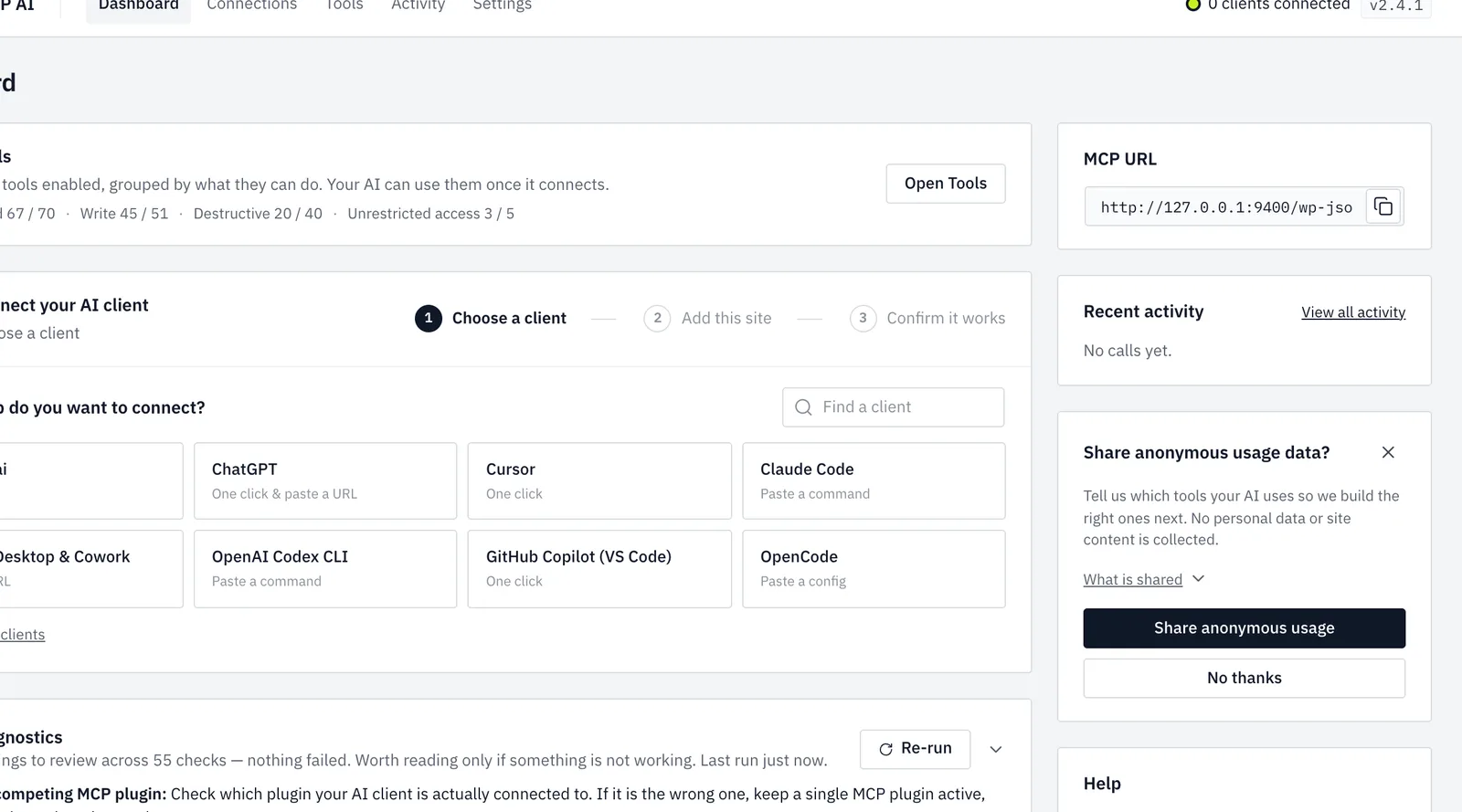
On my bare site the Tools screen listed 166 tools, 135 enabled and 31 disabled. The rest of the headline count comes from integrations for plugins this site did not have, such as WooCommerce and SEO plugins. Out of the box:
- Read: 67 of 70
- Write: 45 of 51
- Destructive: 20 of 40
- Unrestricted access: 3 of 5
- Tools set to require approval: 0
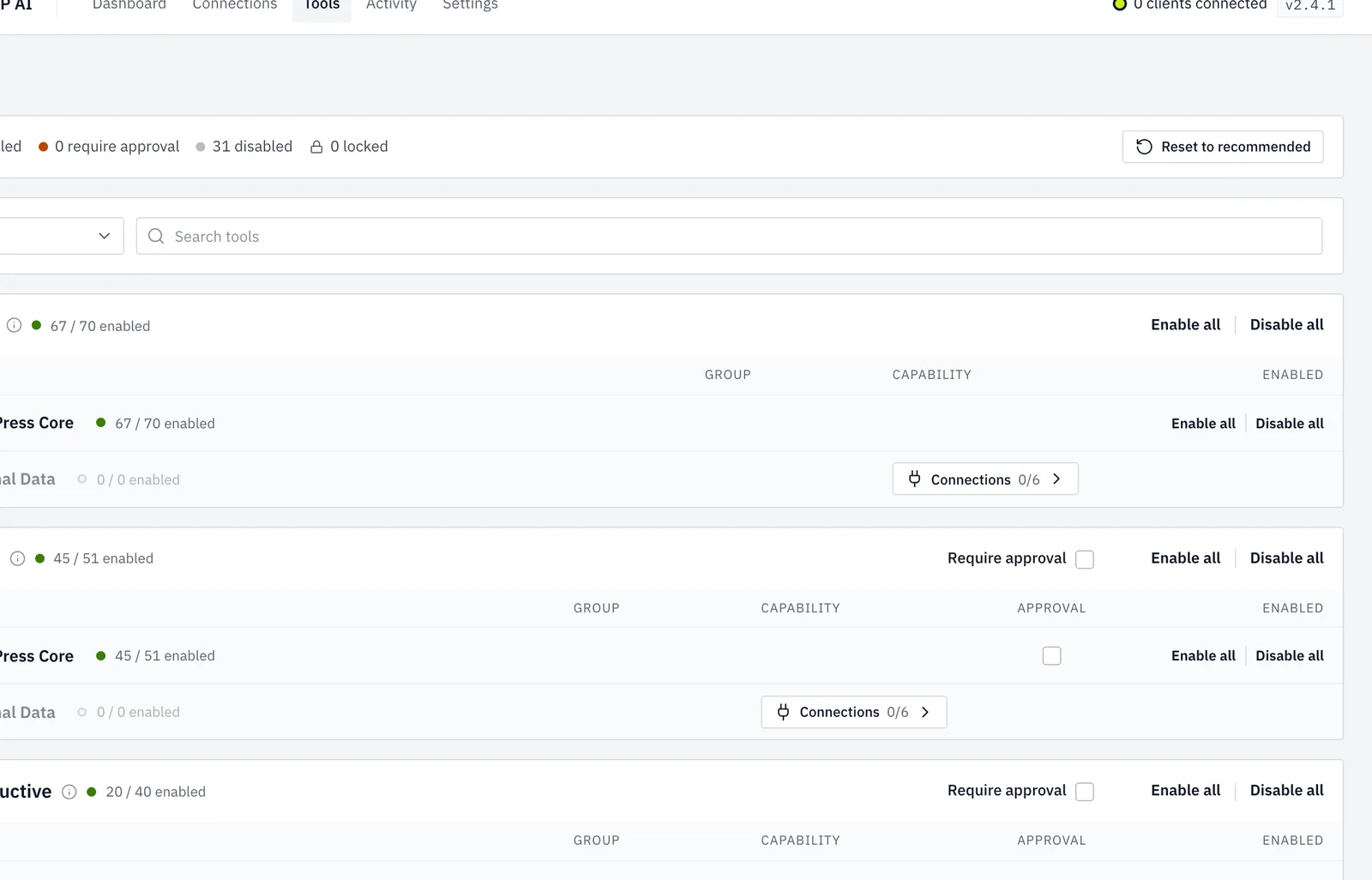
Two tools sit in a "Privileged" group: one reads theme and plugin files under wp-content, the other runs a database-wide search and replace. Whether those are on for you is your call, but know they exist before you hand a token to an agent.
Auth and the oddities
The endpoint returned 401 to a logged-in browser session. It only takes OAuth 2.1 or its own API tokens, which is the right behaviour: session cookies are a confused-deputy risk. It also offers a route that carries the API key in the URL path. That's convenient for clients that can't send headers. It also means the secret lives in a URL, and URLs get copied into logs, chat histories and screenshots, so treat it accordingly.
The diagnostics panel warns you to keep a single MCP plugin active, which is sensible advice I'll repeat in the checklist. The plugin registered 18 public and 49 admin REST routes. After a client connects it downloads signed skills once a day from skills.easymcpai.com, sending only the plugin version; you can turn that off with define( 'EASY_MCP_AI_SKILLS_SYNC', false ); in wp-config.php.
Two limits from its own docs matter here: "Force Draft on Create" is off by default, and the plugin cannot restrict access to individual posts.
Pros and cons
- Pros: free, no relay, wide tool coverage, OAuth 2.1, per-token scopes, rate limits, IP allowlist, audit log with change history.
- Cons: a lot switched on by default, zero tools requiring approval, drafts not forced, no per-post restrictions, and one route puts the key in the URL.
None of that is a flaw. It's a permissive default you tighten on day one.
WPVibe: the hosted relay
WPVibe comes from SeedProd (Awesome Motive). The Repository reported it past 100,000 active installs, and on 17 November 2026 its WordPress.org listing showed 209 five-star ratings out of 216. The likely reason is setup: you install a free GPL plugin, connect once, and Claude.ai or ChatGPT reaches the site in one click. It works on WordPress 6.0+, well below the adapter's 6.9 floor.
The architecture is a hosted, closed-source MCP server at mcp.wpvibe.ai. Per the plugin listing, credentials are encrypted with AES-256-GCM and the service relays tool calls to your site's REST API. The Repository adds that the credentials sit on Cloudflare-hosted servers. That's the trade: you hand a vendor a path into your site in return for no server work. Easy MCP AI's listing makes the opposing point directly, that a hosted service proxies every request through the vendor. Both claims are vendor claims. The architectural difference is real either way.
WPVibe says it never charges for AI inference. You bring your own Claude or ChatGPT plan, and paid tiers raise only the allowance of WordPress actions.
Pricing
Billed annually, per WPVibe's pricing page (checked 17 November 2026):
| Plan | Price | Tool calls |
|---|---|---|
| Free | $0 | 100 per rolling 24 hours |
| Pro | $99 per year | 500 |
| Power | $299 per year | 2,000 |
| Agency | $599 per year | 5,000 |
| Scale | $899 per year | 10,000 |
The free plan includes every tool and skill, which is generous. The Agency plan lets agencies invite clients.
Builder skills and safety
WPVibe lists support for Elementor, Divi, Bricks, Beaver Builder, Breakdance, SeedProd and GeneratePress, plus 125+ WP-CLI commands and file access. Its safety design is thoughtful: a default-deny WP-CLI allowlist, SELECT-only SQL unless you approve otherwise, theme edits in a draft sandbox that goes live only when you publish, deletes that go to trash, and an append-only approval log. Per the listing, an auth fallback it documents can be disabled with define( 'WPVIBE_DISABLE_AUTH_FALLBACK', true );.
The HTTPS gate and the 61 routes
On my local site WPVibe stopped with: "This site needs HTTPS before it can connect." Fair enough. Requiring HTTPS is a good guardrail, and it's why I couldn't run it connected.
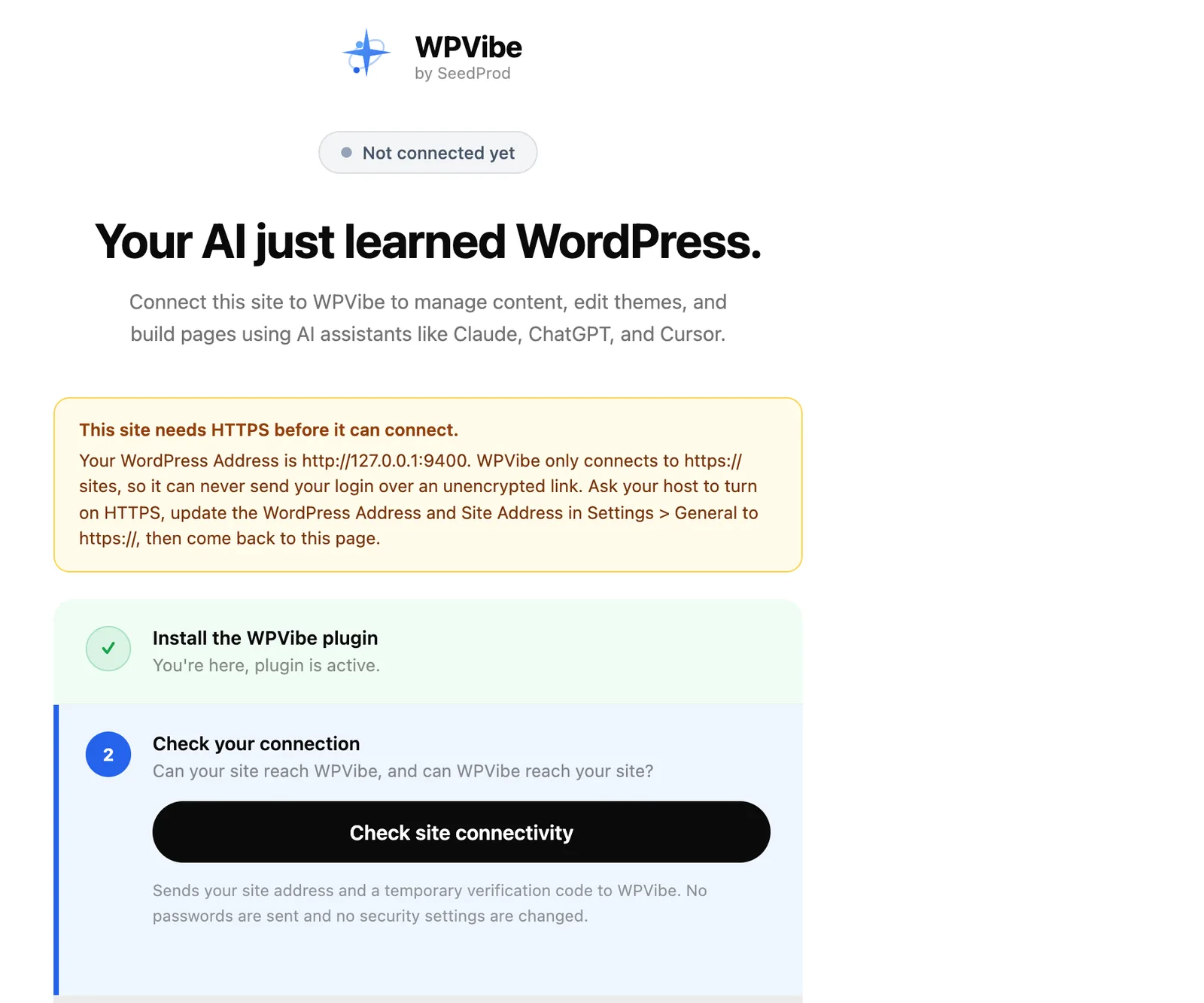
What I could see is what the plugin registers: 61 REST routes that the hosted server calls. They include file read, write, edit and delete, WP-CLI run, code snippets, draft theme publish, and save-page routes for Elementor, Beaver Builder, Breakdance and Bricks. That's the "reaches the whole site" claim made concrete. A wide reach needs the approvals and allowlists above to carry the weight, so read how they're configured on your plan.
- Pros: one-click setup, works on older WordPress, free tier with every tool, thought-through approval and sandbox model, builder skills.
- Cons: closed-source hosted server, daily tool-call metering, needs public HTTPS, a vendor account sits between you and your site.
The official route: MCP Adapter, Abilities API and WordPress.com
The Abilities API is in core from WordPress 6.9. It's a registry where core, plugins and themes declare what they can do, with input and output schemas and a permission callback. When something executes an ability, the API validates the input, checks permission, runs it, validates the output and returns JSON. Core ships three abilities: get-site-info , get-user-info and get-environment-info.
The MCP Adapter exposes those abilities as MCP tools. It requires WordPress 6.9 and sits at 70,000+ installs, published under the WordPress.org account. It replaces Automattic's wordpress-mcp repository, which was archived on 17 September 2026.
On my fresh site, over HTTP, it initialised and then demanded an MCP-Protocol-Version header. tools/list returned exactly three tools: mcp-adapter-discover-abilities , mcp-adapter-get-ability-info and mcp-adapter-execute-ability. No ability was public by default. One REST route registered. That's about as small a footprint as you can get, and it is the most careful default of the three. A site has to opt abilities in.
The catch: connecting a web client
HTTP transport goes through the @automattic/mcp-wordpress-remote proxy with an application password, or STDIO via WP-CLI, the route I'd pick for Claude Code with WordPress. Application passwords act with the user's full privileges, and per-password scoping was left as future work in the original integration guide. The developer blog's adapter guide therefore advises a dedicated limited-capability user and read-only abilities for public endpoints.
There's a bigger practical limit. An open GitHub issue (#436) asks for OAuth support, because web clients like Claude and ChatGPT connect through an OAuth sign-in and WordPress has no OAuth server, so they can't connect to the adapter alone today. Until that lands, the adapter suits developers, desktop clients and local workflows better than a marketing lead with a browser tab.
WordPress.com and Elementor
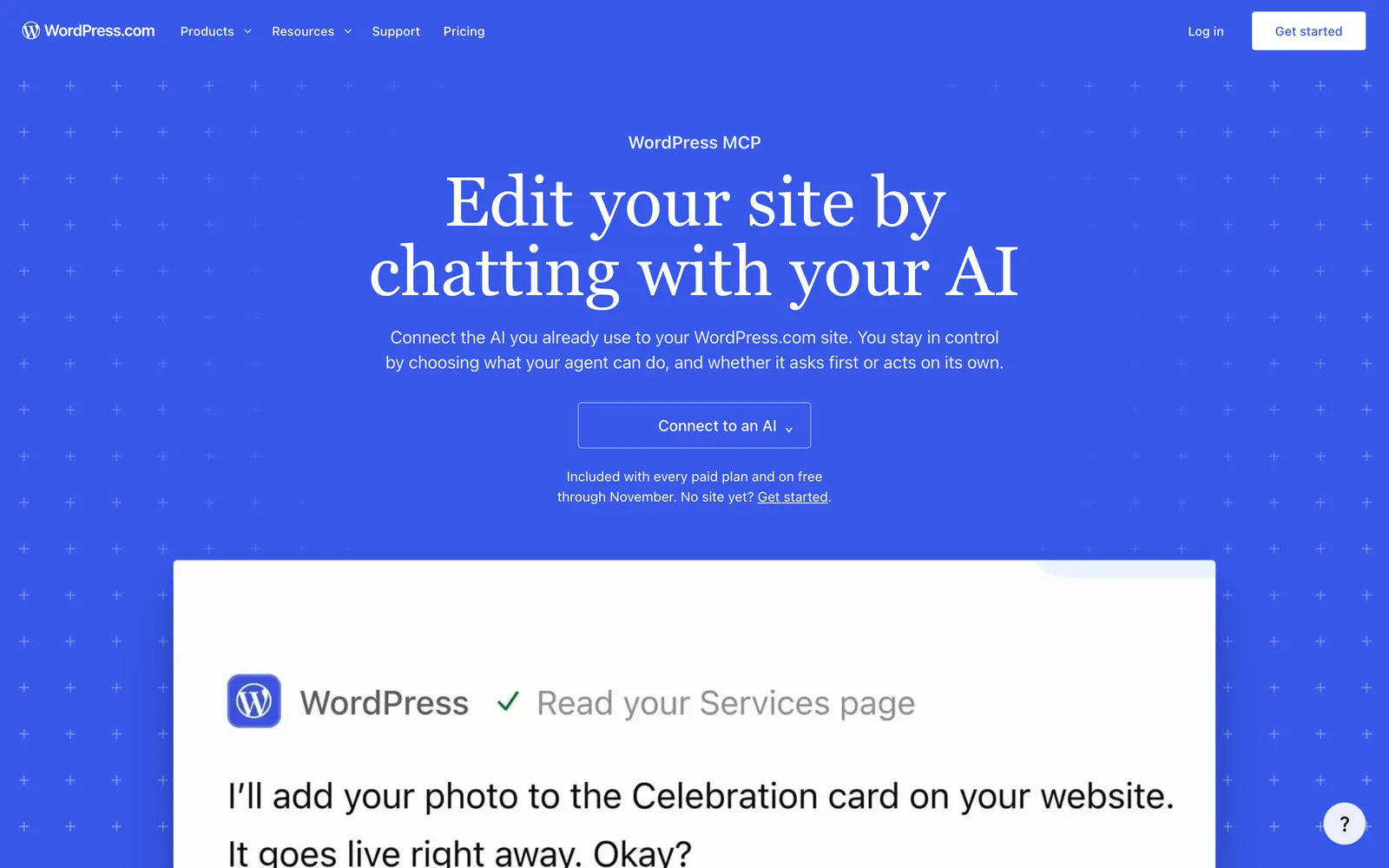
The WordPress.com MCP is OAuth 2.1, one connection for every site on the account, access following the user's role, read-only or full access, and per-site tool toggles. The Claude connector launched read-only on 5 February 2026, with write tools from 20 March 2026. It has no WooCommerce tools. It's included on paid plans; free plans and Jetpack sites get it free only through November 2026, which is now, so check current terms.
Elementor also shipped its own Elementor MCP on 23 September 2026. It's built in, admin-only, creates an application password and saves output as drafts. A tidy design for Elementor sites, with the obvious limit that it speaks Elementor.
- Pros: official, free, schema-validated abilities, private by default, dedicated-user guidance, OAuth on WordPress.com.
- Cons: tiny surface until abilities are registered, web clients can't connect to the adapter directly yet, application passwords are all-or-nothing per user.
The four options side by side
Sources: plugin listings, vendor docs and my 17 November 2026 install. Terms change, so check before you buy.
| Easy MCP AI | WPVibe | MCP Adapter | WordPress.com connector | |
|---|---|---|---|---|
| Where the server runs | Inside your site (PHP) | Hosted at mcp.wpvibe.ai | Inside your site | Hosted by WordPress.com |
| Auth | OAuth 2.1 with PKCE, API tokens | Hosted account, site connection | Application passwords via proxy or WP-CLI | OAuth 2.1 |
| Default exposure on a fresh site | 135 tools enabled, 0 needing approval | 61 plugin routes; approvals and allowlists per docs | 3 tools, no public abilities | Per-site toggles, read-only or full |
| Price | Free | Free to $899 per year, metered | Free | Included on paid plans |
| Best for | Self-hosters wanting breadth and no relay | Non-developers wanting one-click setup | Developers building their own abilities | Sites already on WordPress.com |
The page-builder lesson, turned around
The essay's title is about what page builders taught its author. I think they taught something different.
Page builders gave non-developers layout control, and the price was that content went into builder-specific formats. Your page stopped being content and became a structure only that builder could read cleanly. Anyone who has migrated away from one knows the cost.
Now look at what MCP plugins that wrap builders do. WPVibe's 61 routes include save-page routes for Elementor, Beaver Builder, Breakdance and Bricks. Easy MCP AI integrates with plugin ecosystems too. An agent writing Elementor or Bricks data is writing that proprietary shape, and every page it produces deepens the lock-in. The agent works, the site looks right, and you've still made the format dependency heavier. Faster, in other words, not freer.
The agent isn't the problem. It's what the agent is asked to write. If the thing underneath is a loosely structured blob, validation is mostly visual: does the page render? If the thing underneath is a typed document with a schema, the question changes: does this match the contract? Models are decent at the second question and poor at the first when they can't see the screen.
That's the contrast that matters. WordPress's own Abilities API points in this direction, with schemas in and schemas out, but most of the tool surface people are connecting today sits on the older side.
The headless alternative
The front end is Next.js or Astro, and the content layer is where the agent contract lives. The frameworks themselves set the boundary: Next.js 16+ has a dev-time MCP endpoint for diagnostics (errors, logs, routes), not content editing, and Astro offers a read-only docs MCP. So the content system supplies the editing tools. Four options:
- Payload: the `@payloadcms/plugin-mcp ` plugin is MIT-licensed with an endpoint at
/api/mcp. API keys carry per-collection, per-operation toggles, and the key's user still passes Payload's access control and hooks. An agent can't do what the user can't do, and your business rules still fire. - Sanity: a hosted server at mcp.sanity.io, OAuth by default or a role-limited token. It handles GROQ queries, document create, patch and publish, releases and schema tools. Documents are validated against the deployed schema, though custom validation rules are currently skipped over MCP, so don't lean on them as your only gate.
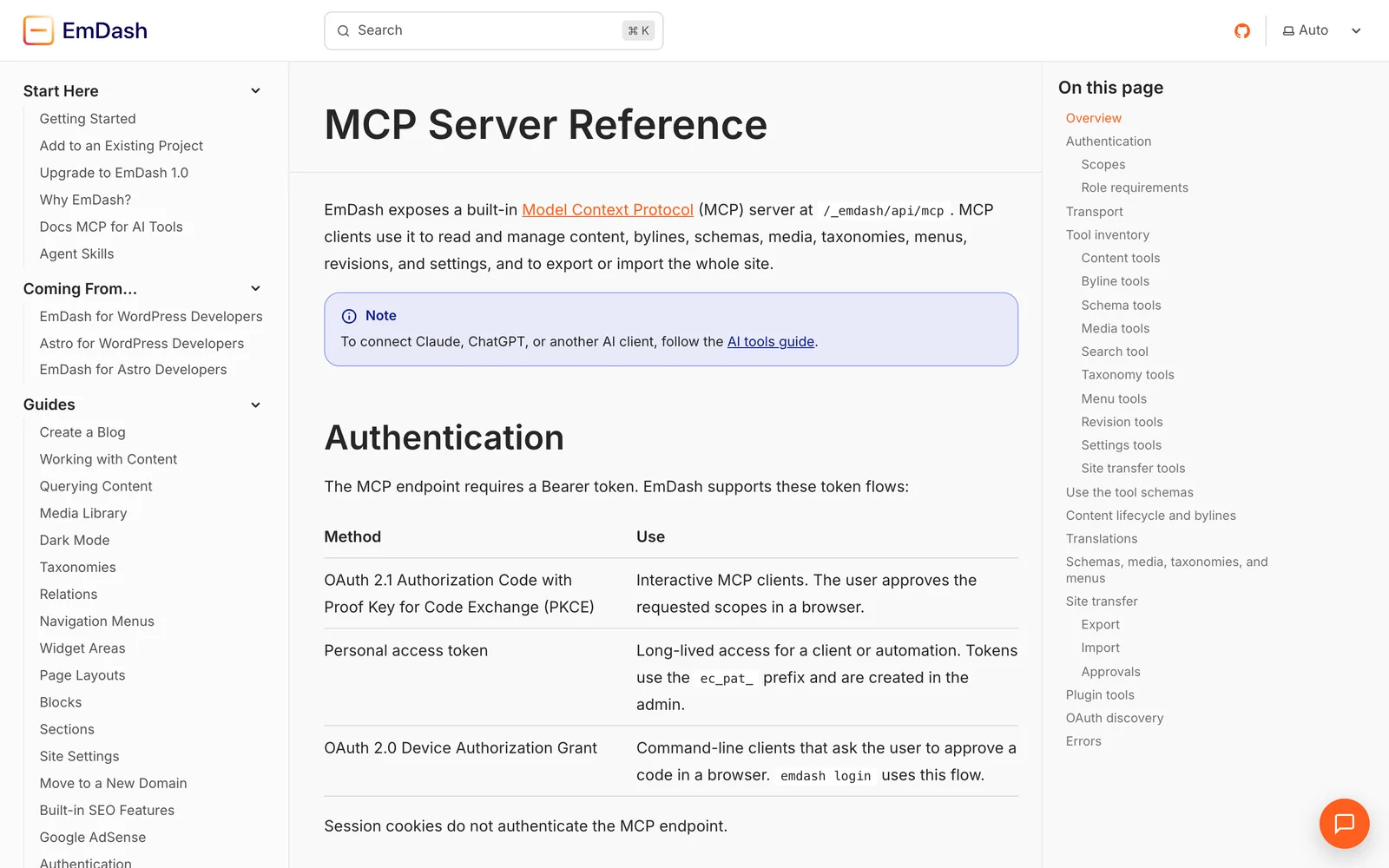
- EmDash: Cloudflare's MIT-licensed TypeScript CMS (1.0 on 28 September 2026), built as an Astro integration. Every site has a built-in MCP server at
/_emdash/api/mcpwith OAuth 2.1, personal access tokens or device flow. Scopes likecontent:readandcontent:writeintersect with the user's role, and session cookies are rejected, much like Easy MCP AI's 401. Plugins run in sandboxed isolates. Matt Mullenweg disputed the "spiritual successor" framing, which is a fair debate, but the EmDash CMS MCP design stands on its own. - Supabase: a hosted server at mcp.supabase.com with OAuth, project scoping, feature groups and a
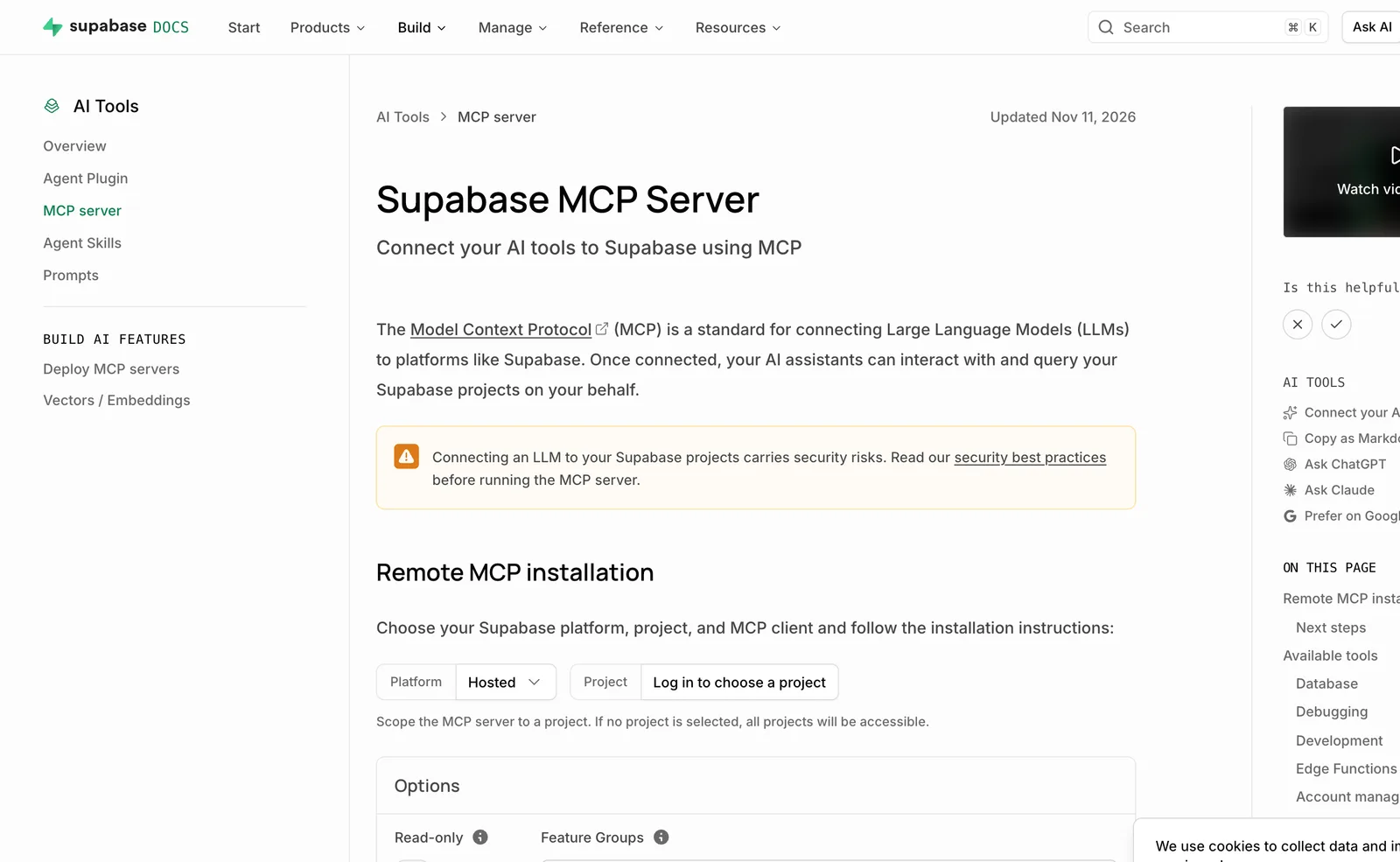
read_onlyflag that runs queries as a read-only Postgres user. The docs warn about prompt injection and say not to connect it to production data. Respect that. For a worked example of building your own, see building an MCP server with Supabase and TypeScript.
Why this makes a better contract
Three things line up. A typed schema tells the agent exactly what a valid document is, so bad output fails loudly instead of rendering oddly. Git means every change to code and schema is reviewable and revertable. Preview deploys mean an agent's content or code change can be looked at on a throwaway URL before anything reaches production. On a live WordPress site, approvals and drafts have to do that job instead.
If you want help scoping a move like that, see headless CMS development.
What WordPress still does better
Be fair about this. WordPress editors are familiar to a huge number of people, and for many teams the editing experience is the product. The plugin ecosystem is broad, so you rarely build from scratch. Hosting is available everywhere, at every budget. Headless means a front-end deployment, a content model to design and a team that can maintain both. If nobody on your side writes TypeScript, a hosted relay with sensible approvals may serve you better than a rebuild. The argument for headless is strongest when agents do frequent, structured work, and weakest for an occasional blog post.
A checklist before you connect any agent to a production site
The MCP security guidance covers confused deputies, token passthrough and scope minimisation. In WordPress terms, that becomes:
- Create a dedicated user. Never connect an agent as your own administrator.
- Grant least privilege. Give that user the narrowest role that works, and switch off tool groups you won't use. Disable destructive and privileged tools first.
- Drafts first. Turn on any force-draft option, and publish by hand until you trust the output.
- Keep the audit log on and read it. Easy MCP AI's 30-day log and WPVibe's approval log exist for this.
- Run one MCP plugin. Easy MCP AI's own diagnostics say so. Overlapping tool sets make behaviour harder to predict.
- Use HTTPS, and prefer OAuth over keys in URLs.
- Test on staging. Run the agent against a copy, then promote.
- Vet the server you install. Our guide to vetting Claude Code skills, plugins and MCP servers walks through it.
One point of context. WordPress MCP plugins have had serious vulnerabilities: AI Engine's CVE-2025-11749 (unauthenticated privilege escalation via the MCP bearer token, CVSS 9.8, fixed after 3.1.3) and CVE-2025-5071 (CVSS 8.8), plus a Patchstack report on 13 November 2026 about privilege escalation in "MCP Server for WordPress" up to 2.0.3 (CVSS 7.2). None of these involve Easy MCP AI, WPVibe or the MCP Adapter. They do show why keeping plugins updated matters.
FAQ
Is there an official WordPress MCP server?
Yes, in two forms. The MCP Adapter is the official plugin for self-hosted sites, bridging the Abilities API to MCP. WordPress.com runs its own hosted MCP and Claude connector for sites on a WordPress.com account. They differ in auth and reach, so pick by where your site lives.
Is WPVibe free?
The plugin is free and the service has a free plan with every tool and skill, limited to 100 tool calls per rolling 24 hours. Paid plans run from $99 to $899 per year and raise the allowance. WPVibe says it never charges for AI inference, so you still bring your own Claude or ChatGPT plan.
Is Easy MCP AI safe?
It has real controls: OAuth 2.1 with PKCE, per-token scopes, rate limits, an IP allowlist and an audit log. But on my fresh install, 135 tools were enabled and none required approval, so safety depends on how you configure it. Tighten the defaults using the checklist above.
Do I need Jetpack for WordPress.com MCP?
Not on a WordPress.com site. Self-hosted sites connect to the WordPress.com MCP through Jetpack. Automattic says no paid Jetpack plan is needed, though some third-party comparisons say otherwise, and free plans and Jetpack sites get access free only through November 2026, so check the current terms.
Can I connect Claude to WordPress without a plugin?
Not cleanly for web clients. Claude on the web needs an OAuth sign-in and WordPress core doesn't include an OAuth server, which is the gap GitHub issue #436 describes. Claude Code can reach a site over STDIO through WP-CLI with the MCP Adapter, which is a developer workflow.
The sharpest fact from the install is the spread in defaults: 3 tools on the official adapter, 135 enabled on Easy MCP AI, and 61 routes behind WPVibe's hosted server. Pick the one whose defaults you can live with, then lock it down. And if agents will edit content often, a typed schema gives them a contract that no builder format can.